
I wanted to ask my infrastructure a question and have the model on my desk answer it.
The model was already there. My DGX Spark was serving Qwen through an authenticated gateway. VCF Operations was already monitoring the lab. VKS was available to run the container between them. I had most of the pieces, and I wanted them to do something together.
The first question that finally worked was simple:
List my vCenters
Intelligent Assist looked up the live Operations inventory, found one monitored vCenter, and returned a link to it. The selected model was Qwen3.8-Flash-Next, running on my Spark.
That was my first complete test: the native Assistant called an Operations tool, used the private model, and returned an inventory object I could open. The provider had already reported Healthy. Now I had evidence of what happened after I asked a question.
Getting there took longer than the model connection suggests. After completing the test, I decided to remove Log Management. The setup worked, but its footprint was more than I wanted to maintain in this lab.
The model was already running
I initially planned to use Gemini. Then a coworker described getting a Spark model connected through the private provider integration, and I started looking at the hardware I already owned.
William Lam’s PAIS model walkthrough showed the native sequence: configure an endpoint and API key, accept the endpoint certificate, discover the models, and select one. His example uses Private AI Services and an OpenAI-compatible model endpoint.
My experiment was to put the existing Spark endpoint behind a private VKS proxy and see whether Operations could use it through that provider screen.
I selected VCF Private AI in Operations, but I did not deploy Private AI Services (PAIS). The provider screen connected to my own endpoint. This is a tested lab integration; vendor support for using that endpoint in place of PAIS remains unestablished.
I wanted to keep inference on the Spark and ask questions inside Operations, where the lab inventory already lived. VKS would host the proxy connecting them.
The first screen sent me back to infrastructure
I opened Advanced Configuration expecting to enter the endpoint. The screen showed Log Management not installed. Enable Services was disabled.
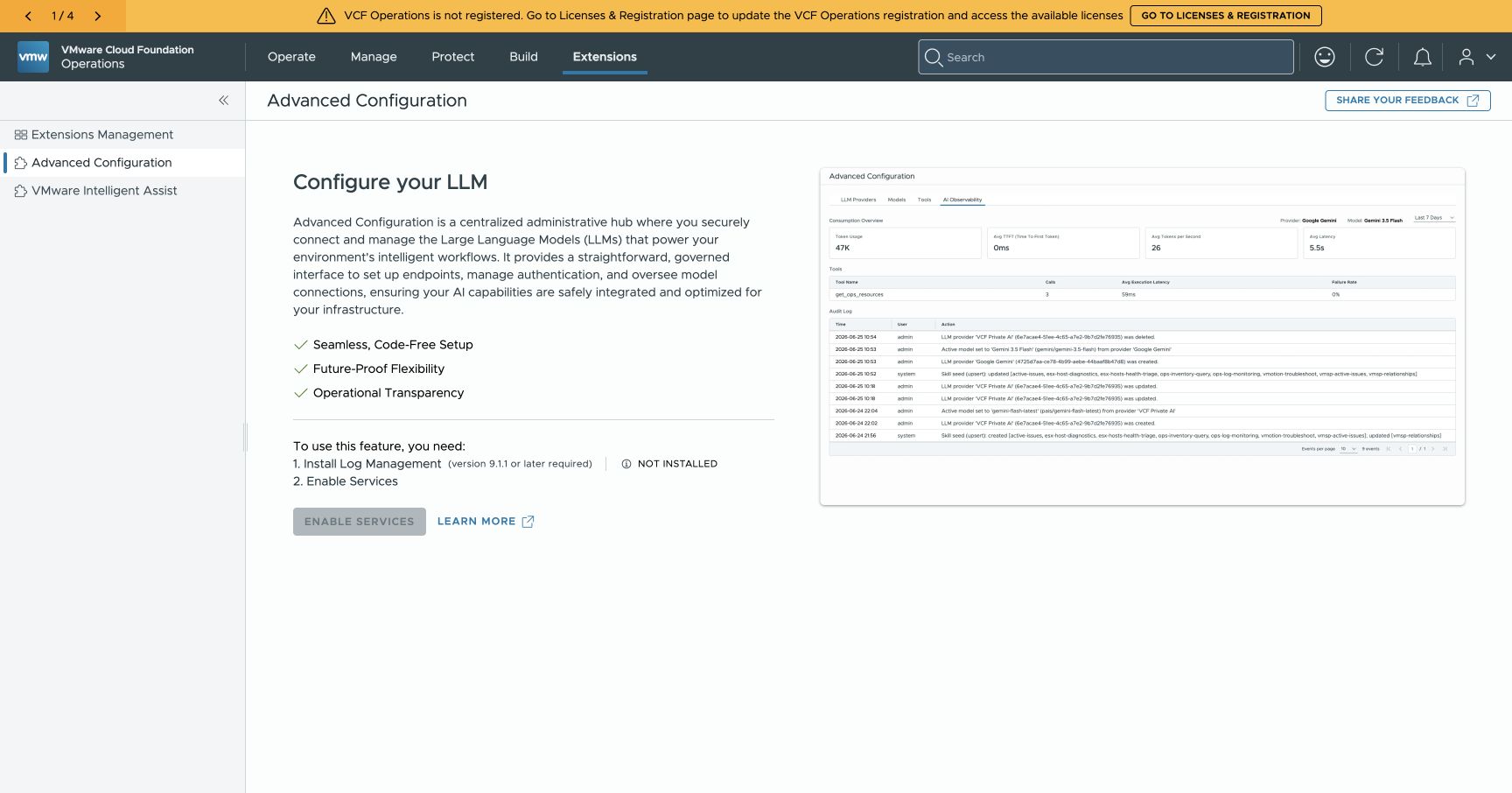
The initial gate in Operations. The model endpoint was a separate piece of work; native AI services still needed their platform prerequisite.
Log Management is part of the setup in William Lam’s Assistant enablement walkthrough. In my lab, that requirement made storage and runtime capacity the next decisions.
The standard Small deployment provisioned a 500 GiB log store, 60 GiB processor data volume, and 15 GiB debug volume. The install replaced the initial two management runtime workers with larger workers. Enabling AI services later caused native autoscaling to add a third worker.
The resulting runtime had three workers at 16 vCPUs and 32 GiB each, alongside its 4-vCPU, 10-GiB control plane. Those are the runtime nodes, with other management services sharing the platform; they are not a standalone Log Management appliance specification.
The capacity plan had to include those workers, their replacement during installation, and the services already on the MS-A2. Its physical DRAM is 128 GB. Software memory tiering adds NVMe capacity to the memory ESXi reports, so the configured guest memory totals do not represent extra physical DRAM.
We tried an initial storage override to reduce the footprint. A precheck accepted a candidate, but the installation rejected the storage field. The deployment that succeeded used the standard Small configuration with default storage.
I would not plan around that override based on the precheck. The installer rejected it, and the default Small deployment is the one I actually completed.
The space was tied up in an old restore
Two obsolete Devlab restore staging disks on the main MS-A2 datastore were consuming roughly 990 GiB. We reclaimed this space before submitting the default Small installation.
One disk still held the original recovery image. Before retiring the staging disks, we copied the image to a separate recovery datastore and verified the complete destination with a SHA256 checksum. The live workloads and preserved recovery material remained intact.
The staging-disk cleanup recovered about 990 GiB of physical storage before installation. A later free-space check, taken at 04:37 UTC on October 6 after Log Management provisioning, measured approximately 2,047 GiB on the main datastore and 574 GiB on recovery.
Nested vSAN consumes space on that physical backing datastore. I counted the backing datastore’s free space once. Adding the nested datastore’s advertised capacity would have overstated the room available for this installation.
Before that cleanup, we tried moving live nested vSAN cache backings. That move caused a storage outage and required recovery work. It was a separate storage mistake, not evidence that Log Management caused the outage. I would not repeat that approach.
Native encrypted service backups were completed and their manifests and checksums checked before the runtime changes. That established archive integrity. A full restore test remains a separate piece of work.
A container in VKS gave Operations a path to the Spark
The endpoint I added to Operations was:
https://qwen-ai.pranavwebservices.labBehind that name, the request takes this path:
Operations runtime
  → LAN TLS passthrough
  → VKS HTTPS proxy
  → mutual TLS relay
  → existing Tailscale connection
  → Spark gateway and Qwen
Qwen runs on the Spark. The VKS workload is a lightweight HTTPS proxy. TLS terminates at that proxy, the relay uses mutual TLS, and the Spark gateway requires the existing API key. The relay does not store that key.
The proxy exposes a narrow set of paths for health checks, model discovery, and chat completions. It runs without root privileges, with a read-only filesystem and bounded resources.
The path needed two corrections before it worked from the management runtime. Antrea translated ingress traffic to a node gateway address, which changed the source address the network policy saw. The runtime also routed the VKS load-balancer network toward the home router.
We used the source address actually observed to correct the policy. A restricted LAN TLS passthrough supplied the reachable front door, keeping the managed runtime routes intact. Then we checked DNS, hostname validation, and HTTPS from a management runtime node.
That test was more useful than another request from my laptop. The service making the model request needed to have the route, the DNS answer, and the certificate validation it would use during a real conversation.
Tool calls had to survive the proxy
The Assistant has to turn a question into an Operations tool call and use the returned data in its answer. I needed the proxy to preserve that conversation, including responses arriving in a stream.
We tested model enumeration, authentication, ordinary tool calls, and streamed tool calls. The streamed response preserved the call identifier, incremental arguments, usage information, finish reason, and final completion marker. Those fields let the client assemble the tool request and recognize when the model has finished.
The gateway passed those protocol checks. The next test was the native Assistant making a real request inside Operations.
This is a useful separation when debugging the connection. A model can answer a direct request while a proxy buffers its stream, a route blocks the runtime, or a native provider fails model discovery. Each successful check covers a particular part of the path.
The native connection took a few fields
Once the original Log Management installation completed and the AI configuration services were ready, I returned to Extensions → Advanced Configuration → LLM Providers.
I added VCF Private AI, entered the private endpoint, and used the existing Spark gateway key. Operations displayed an endpoint certificate prompt. We compared its fingerprint with the preserved certificate created for the proxy and accepted that exact match.
The provider reported Healthy.
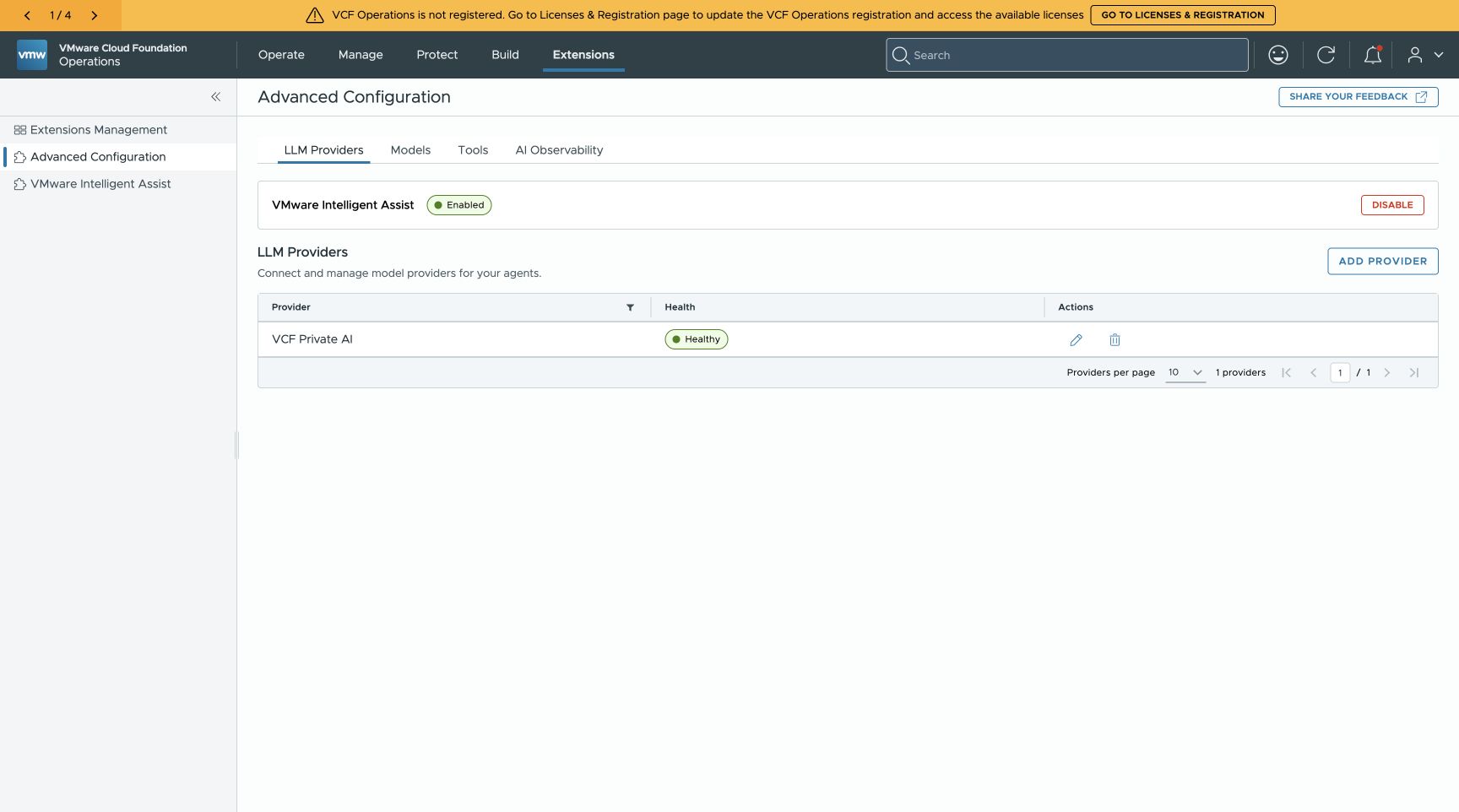
The native provider connection succeeded against the private Qwen endpoint. The credential is not shown.
In Models, Operations discovered Qwen3.8-Flash-Next. I selected it as the global model for the native agents.
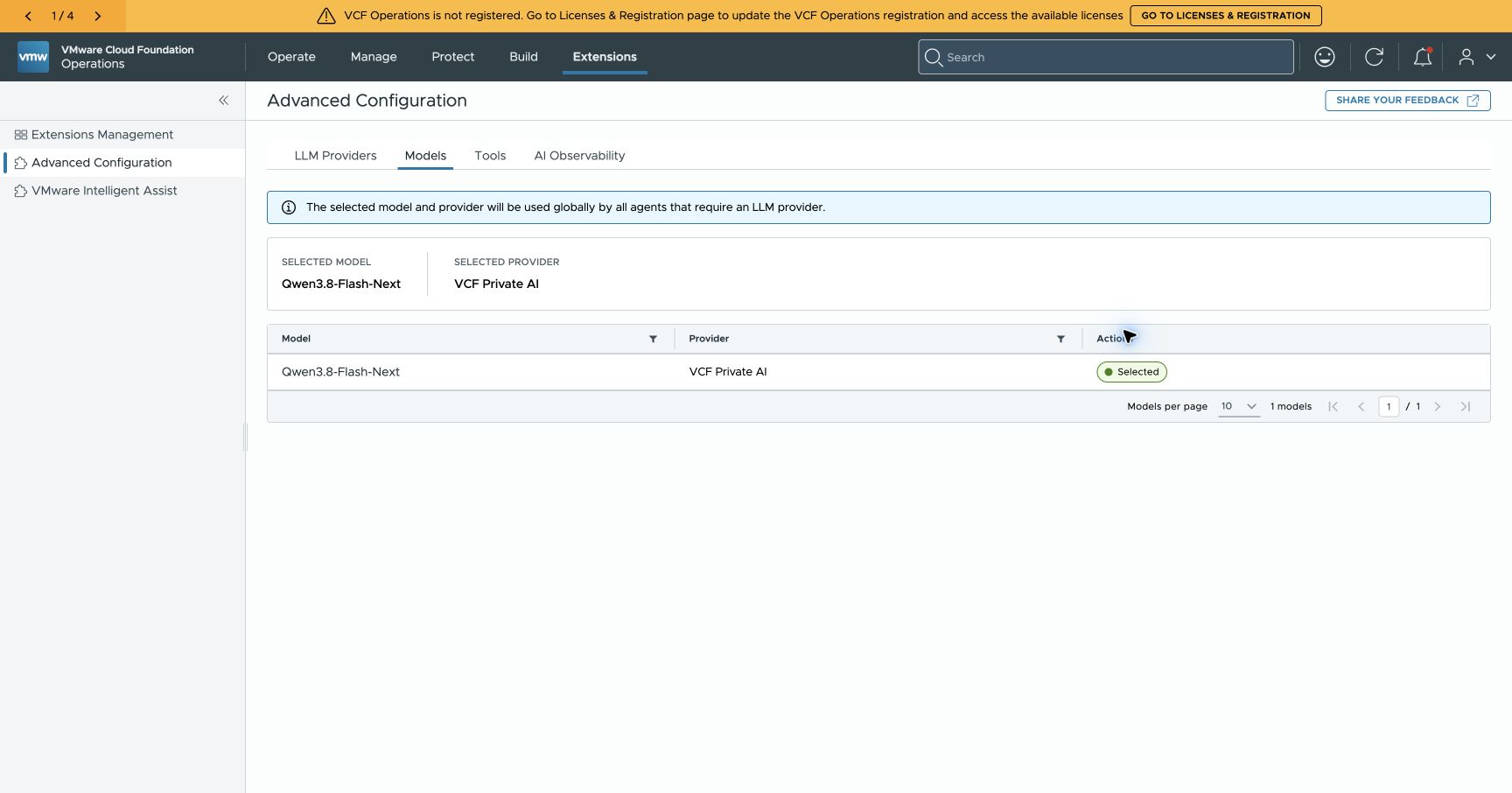
Qwen is selected in Advanced Configuration, with VCF Private AI as its provider.
The provider and model were ready. I still needed a successful question in Intelligent Assist.
The answer included a resource I could open
I opened Extensions → VMware Intelligent Assist and selected List my vCenters.
The analysis panel showed the agent looking up VMwareAdapter Instance resources in Operations. Its lookup included the resource identifier, name, kind, and health fields. I could see the live tool interaction before the answer completed.
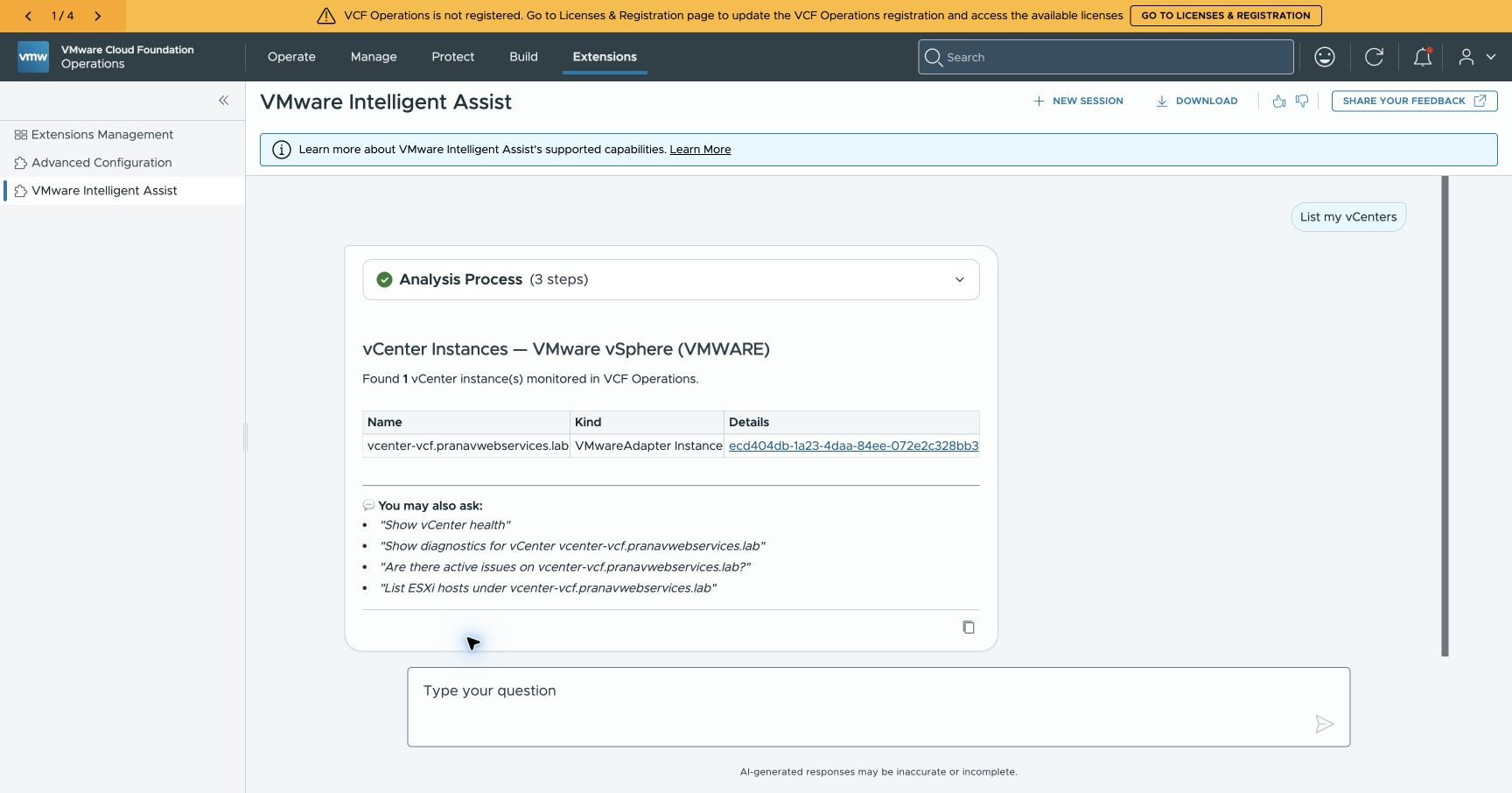
The analysis process exposes the inventory lookup used for this request.
The completed response reported one monitored vCenter, vcenter-vcf.pranavwebservices.lab, and included a link to that resource in Operations.
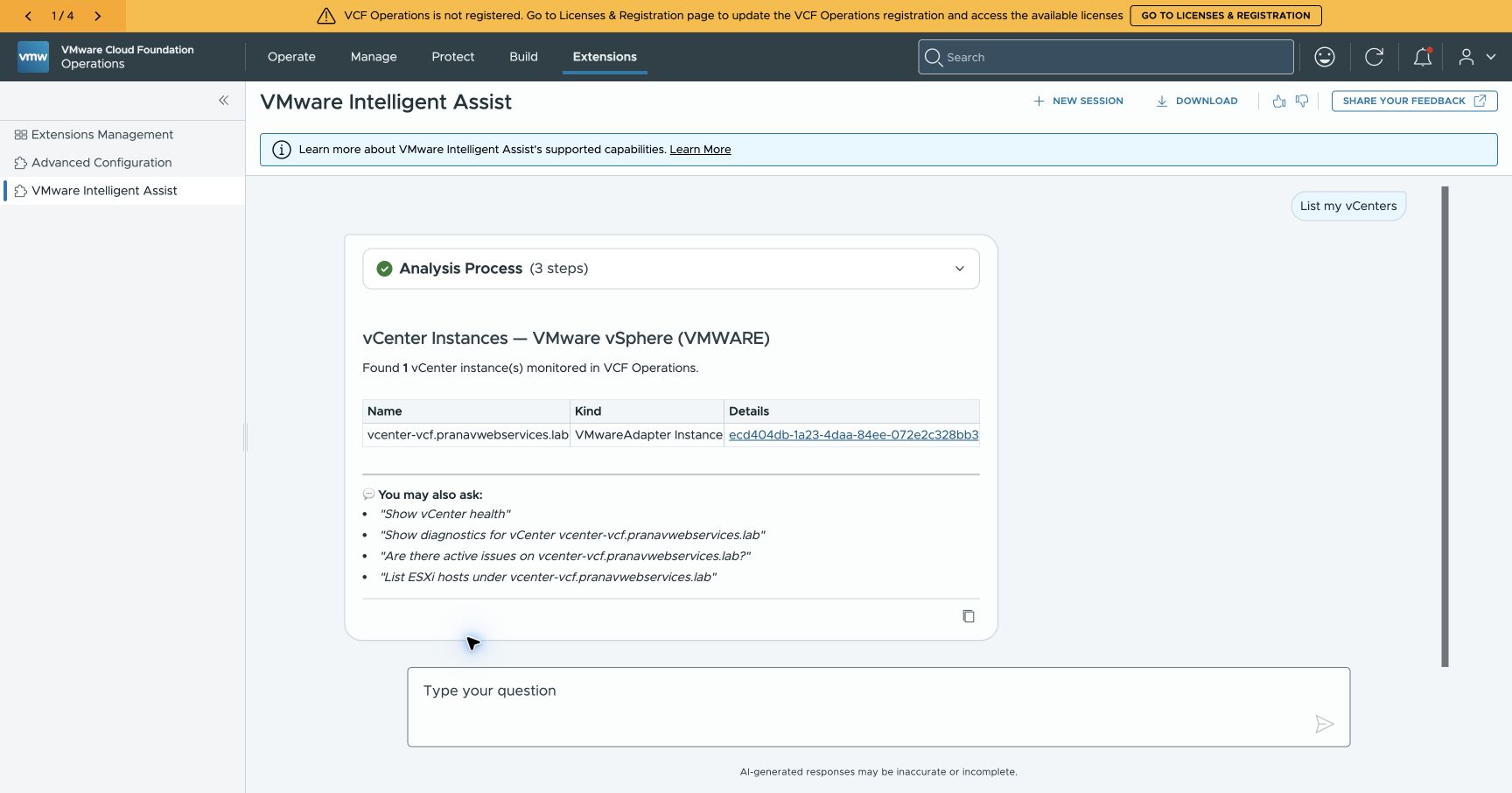
The completed request, using the selected private Qwen model. The Operations registration warning remained visible during the successful query.
That link matters to me. It gives me somewhere to go after reading the answer. The agent has identified an object in the platform, and I can continue the investigation against the same object.
This request verified the native provider, selected model, inventory tool, and completed answer. Diagnostic accuracy and comparisons with other models still need their own tests.
Why I am not keeping it
The integration worked. Intelligent Assist used Qwen on my Spark, queried live Operations inventory, and returned a resource link. That is the result I can demonstrate.
I decided to remove Log Management after completing the test. The required deployment and resulting management runtime footprint were more than I wanted to maintain in this lab for the use I had demonstrated. The three workers also hosted other management services, so their full resource allocation should not be attributed to Log Management alone.
This is a decision about my lab capacity and how I use it. The test does not establish whether the Assistant would justify that footprint in a larger environment or one already running Log Management.
I have not yet tested its diagnostic accuracy on a host issue or a vMotion failure. The successful inventory query should stand on its own, without implying that those investigations passed.
The Spark model remains useful for my other local AI workflows. I can keep private inference without keeping this native Assistant deployment.
I wanted to prove that Operations could use the model on my desk. It could. Keeping the required infrastructure running was a separate decision, and for this lab I chose to stop here.
Views are my own and do not represent my employer.