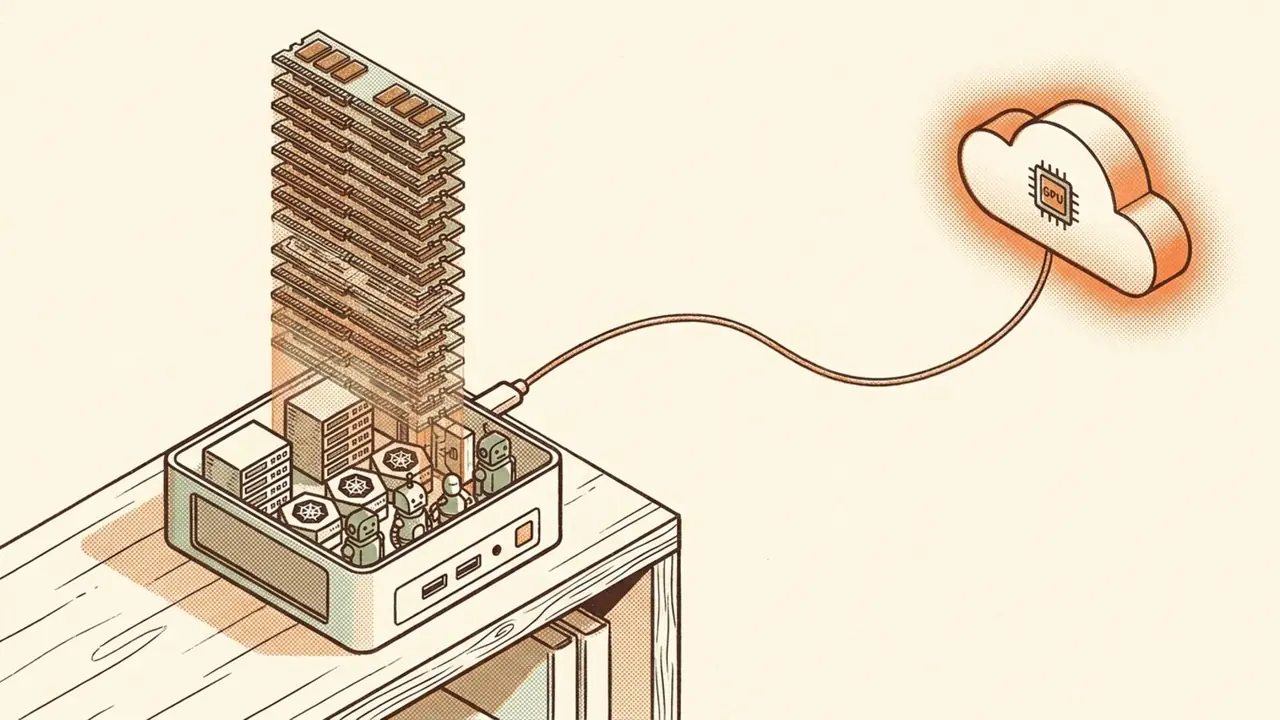
If you've been following along, you already know my homelab is pretty beefy. It's old enterprise-grade gear: a Dell workstation, a couple of NUCs, an EliteDesk, the kind of stuff that used to live in a real datacenter and now lives at my place. On paper it had plenty. But somewhere along the way it stopped taking my AI education where I wanted it to go. It just wasn't enough.
Here's the thing about me: almost every part of me is AI. It's my passion, and it's what I do. I work at VMware by Broadcom, and I spend basically all day thinking about this stuff. But more than the models themselves, what I actually care about is how you use AI safely. That's the whole game for me, and it's where this blog is headed.
So when the lab wasn't cutting it anymore, I did the only thing any reasonable person would do. I went and spent four grand on new hardware.
Meet the MS-A2.
The new box
The MINISFORUM MS-A2 is a mini PC that has no business being this capable. Mine is built out like this:
- Ryzen 9 9955HX: 16 cores, 32 threads
- 128 GB of DDR5-5600 (2× 64 GB SODIMMs)
- 7 TB of NVMe across three drives: a 2 TB for the hypervisor and boot, a 4 TB for workloads, and a 1 TB doing something I'll get to in a second
- Dual 2.5GbE onboard
It runs bare-metal ESXi, and on top of that it's carrying a small nested cluster: a handful of ESXi hosts living as VMs on the one box, so I get real vSphere cluster behavior (shared storage, HA, the works) out of a machine that fits on a shelf. That alone would've made it worth the money. But that's not the part that got me.
Then memory tiering happened
That 1 TB NVMe I mentioned isn't for storage. It's memory.
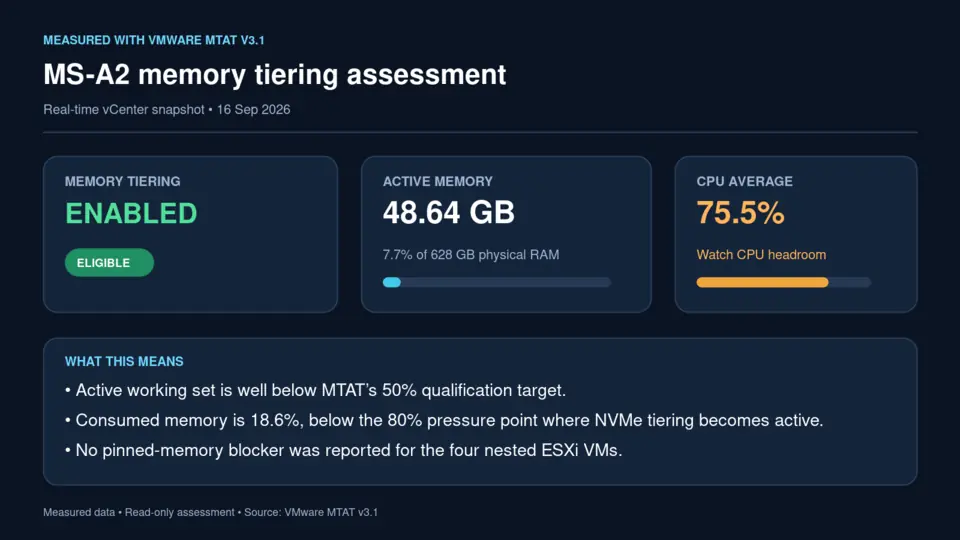
ESXi 9.1 can use a fast NVMe drive as a second tier of RAM, so the hypervisor treats hot pages as real memory and pushes colder pages down to the SSD. The result is a little ridiculous: 128 GB of physical DDR5 turns into roughly 628 GB of addressable memory on this box. That's the difference between "I can run a couple of appliances" and "I can run the whole stack (NSX, Operations, Kubernetes, the AI pieces) all at once, on one mini PC."
I did not figure this out in a vacuum. Huge thanks to Devyn Harrington, whose write-ups on NVMe memory tiering are basically the template I followed, and William Lam, who is the authority on running this class of gear as a real VMware lab. If you're going down this road, start with their stuff.
Fair warning, because I try to keep it honest here: tiering is deliberate overcommit, not free RAM. You're trading some performance on cold pages for a lot more capacity. For a lab where I want to hold a big stack and learn it, that trade is exactly right. For latency-critical production, you'd think harder. But for what I'm doing, it changes everything.
What I actually want to do with it
Here's the mission, and it's the reason I bought the thing.
I want to make demos. Real ones. I want to show you what it looks like to bring expensive workloads on-prem instead of renting them forever. And then, more importantly, what to actually do with agents once they're in your environment, and how to secure them. That means the VMware private cloud stack I care about most:
- VKS: Kubernetes, the place the agents and AI workloads actually run
- PAIS: Private AI Services, the on-prem home for the model and agent tooling
- vDefend: because "cool agent demo" and "secure environment" have to be the same sentence
I'm not just going to show you neat agent tricks. I'm going to show you how to run them safely in your own environment, and how to keep that environment secure while you do it. That's the part most AI content skips, and it's the part I think matters most.
Right here, I'm going to show you AgentMinder and the entire stack around it, and how you actually safeguard your agents instead of just hoping they behave. And I'm not going to pretend it's the only option: I'll line it up against the other products in this space so you can see, honestly, where each one wins and where it doesn't. This is the part I really want you to follow along with. We're building it together, so come with me.
I've also got some fun stuff coming on Muse that I can't wait to write up.
Oh, and I don't own a GPU
Here's the part I'm actually hyped to show you: you don't need a GPU sitting in your house to do any of this.
I don't have one. What I've got is Lambda credits, so I funnel my inference through them. I rent the accelerator by the hour when a workload needs it, shut it off when it doesn't, and I lean hard on open-source models for the rest. That's the whole point of keeping the brain on-prem and the GPU off-box: your data, your agents, and your control plane stay home, and you only pay for the expensive muscle when you're actually flexing it. A big part of what I want to show you is just how far open source plus rented compute can take you.
Quick fundraiser while we're here: an RTX 5090 is scalping for around $7,900 right now. For a gaming card, be so for real. So if 1,580 of you buy me a $5 coffee, that's a 5090 and I can finally run some of this at home. We're basically one group chat away. Buy me a coffee. ☕ (Half joking. LOL.)
What's next
Once I saw what memory tiering could do, I realized what I'd gotten myself into. I'm gonna have to invest more (send help).
The next move is my Dell. It's been running Proxmox, and it's where all my agentic stuff currently lives. I'm going to shift those workloads over to the MS-A2 temporarily, drop a new NVMe drive into the Dell, and rebuild it as bare-metal ESXi, and then tier that box too. Two properly juiced hosts instead of one. Then the workloads come home.
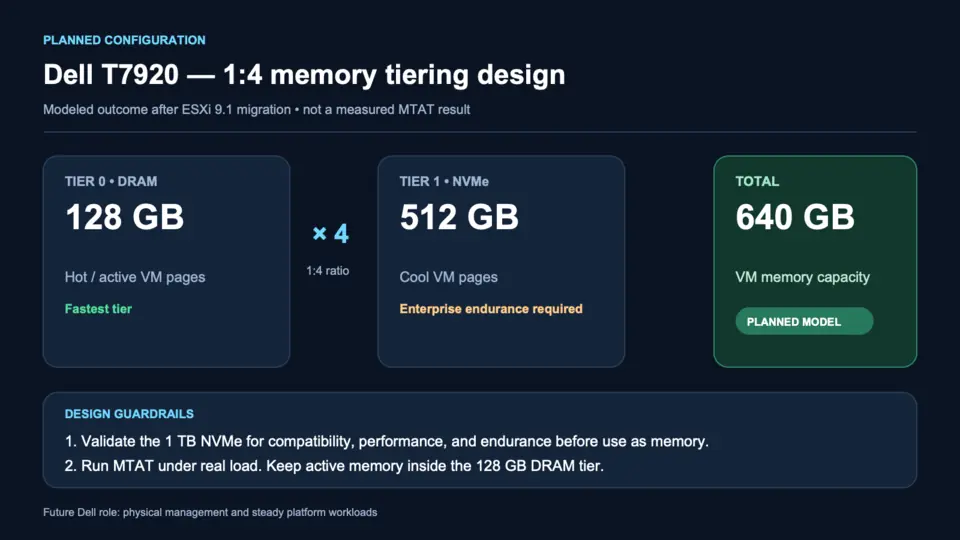
That migration is going to be its own post, because moving the machine that runs everything, without a proper maintenance window, is exactly the kind of thing I like writing about.
I'm also restructuring this blog to be more me. Still professional, still informative, like it's always been, just more honest about who's actually writing it and what I'm obsessed with.
So stay tuned. I'm gonna keep pumping out content.
Let's connect
- Follow me on X: @pranav_patel06. That's where the day-to-day and the half-baked ideas live.
- Buy me a coffee: see above. We're only 1,580 coffees away from a 5090. ☕
- Want our agents to actually talk to each other? Get verified with me on Instinct so our agents can chat. Let's talk.