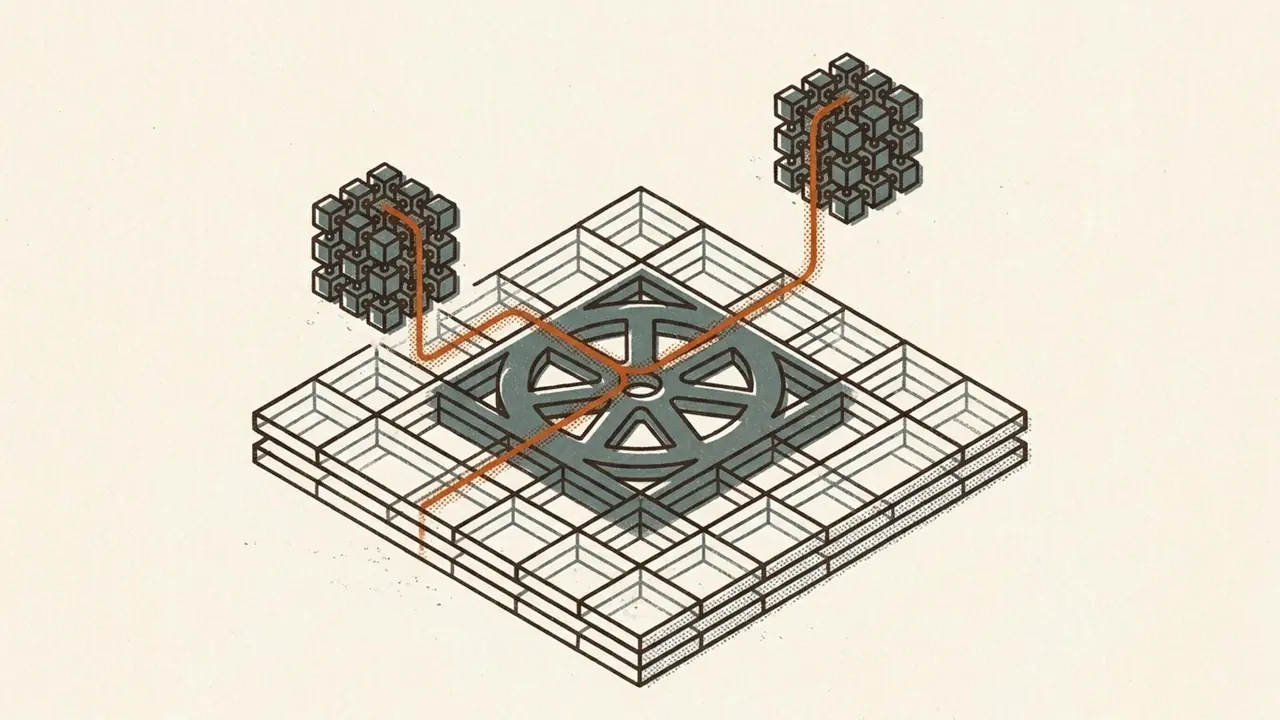
I have built Kubernetes the tedious way more than once: a stack of Linux VMs, kubeadm, a CNI I had to argue with, a load balancer bolted on the side, and a management cluster whose only job was to babysit the other clusters. It works. It also means you now run two platforms — the virtualization you already had, and a second one that speaks a different language, patches on a different schedule, and fails in ways your VI admins have never seen. vSphere Kubernetes Service is Broadcom's answer to that specific tax, and after enabling it end to end I think the pitch is narrower, and more honest, than the marketing makes it sound. This is the build log.
The two layers of vSphere Kubernetes Service
First, the naming, because it trips everyone. What used to be Tanzu Kubernetes Grid Service is now vSphere Kubernetes Service — VKS. The node images that were Tanzu Kubernetes releases are now vSphere Kubernetes releases, VKr. The rename landed with the VKS 3.3 GA in March 2025, and it is not cosmetic: it reflects that Kubernetes is now a first-class vSphere capability rather than a bolt-on product line. Broadcom has not re-slugged every documentation URL to match, so you will still see 'tkg-service' in link paths on current pages. That is lag, not staleness.
The architecture is strictly two layers, and understanding the split is the whole game. The bottom layer is the Supervisor: a Kubernetes control plane embedded directly into ESXi and vCenter, running as one VM for a proof of concept or three for HA, with a kubelet ported to run natively on the hosts. The Supervisor is not meant to be your general-purpose Kubernetes — it exists to manage vSphere through a Kubernetes API. The top layer is the VKS 'guest' cluster: a full, CNCF-conformant, upstream Kubernetes cluster made of ordinary control-plane and worker VMs that the Supervisor provisions on request. The conformance claims apply to the guest clusters, which are submitted to the CNCF per Kubernetes version — not to the Supervisor. Keep those two straight and the rest of the system reads cleanly.
Prerequisites, licensing and storage
Now the part the brochure skips. Before any wizard, there is a checklist that quietly decides whether the enablement will succeed or stall. You want at least three hosts with vSphere HA on and DRS in fully automated mode. You want working forward and reverse DNS and a real NTP source, because Kubernetes certificate issuance depends on both, and a bad clock is the single most common reason enablement hangs at the certificate stage. You want an MTU of at least 1600 end to end — VMware recommends 1700 for headroom — and an undersized MTU on any hop is a classic silent failure. You need a VM storage policy to already exist. And you need to decide, permanently, whether this is a one-zone or three-zone Supervisor: you cannot expand a one-zone deployment to three zones later. Get that decision right before you click anything.
Licensing is a 60-day evaluation clock. Activate the Supervisor and you have sixty days to assign a real license — a Cloud Foundation or vSphere Foundation solution license, or a legacy Enterprise Plus plus Tanzu combination — before it quietly loses capability. With that understood, you start the wizard from the cluster: Activate Supervisor. The first meaningful choice is the control-plane size — Tiny, Small, Medium, or Large — which sets the footprint of the three control-plane VMs. Pick deliberately: you can scale this up later, but there is no downgrade path, so 'Tiny to save resources' becomes a forced resize event the day you need more.
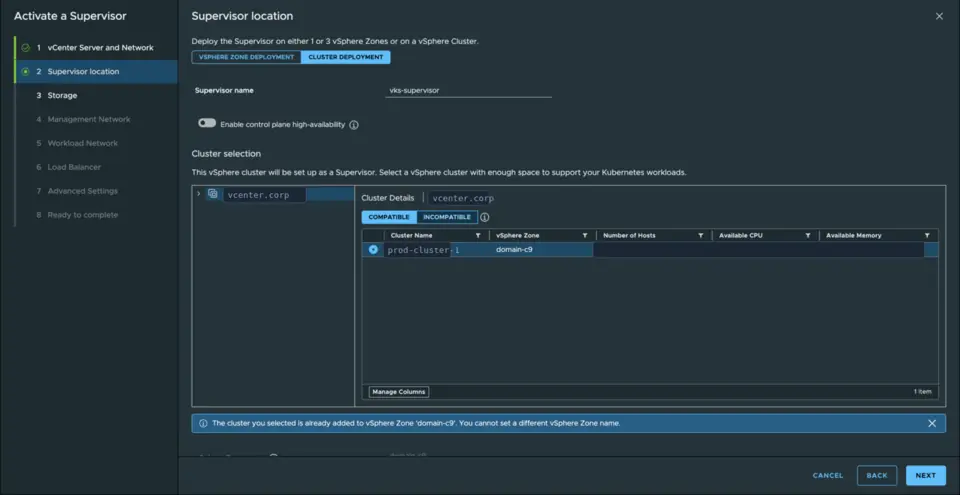
The storage page asks for a VM storage policy for the control-plane VMs, and here is a small decision with long consequences: the policy name you choose becomes, verbatim, the Kubernetes StorageClass name once you later assign it to a namespace. Name it something a developer will understand, not something that made sense only to whoever built the datastore, or you will be renaming-by-recreate later. The backing datastore can be anything already in your estate — the same storage fabric serving your VMs serves the clusters, through vSphere's Cloud Native Storage plumbing.
The network and load balancer
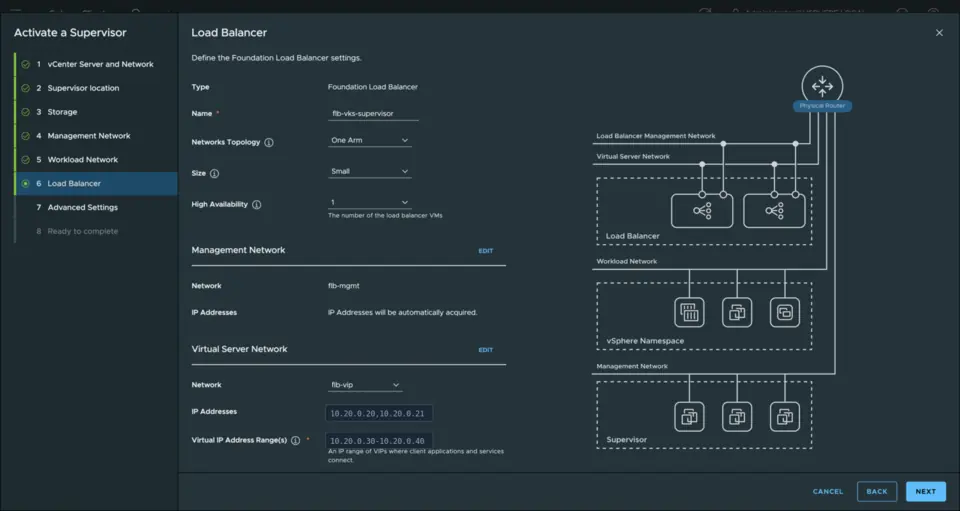
Almost all of the real work here is networking, and this is where vSphere 9 changed the story materially. For years, running the Supervisor meant standing up NSX first — a manager, an edge cluster, Tier-0 and Tier-1 gateways, an overlay transport zone — before a single developer could get a namespace. That requirement is gone. In vSphere 9 you can run the Supervisor on a plain distributed switch with a built-in Foundation Load Balancer, no NSX anywhere in the stack, included with the entitlement you already have. The wizard still makes you lay out the networks by hand: a management network for the control-plane VMs — reserve a small block of consecutive static addresses, since the deployment wants several — and a separate workload network, on its own subnet, carrying cluster and pod traffic. This is fiddly and unforgiving, and it is worth slowing down for.
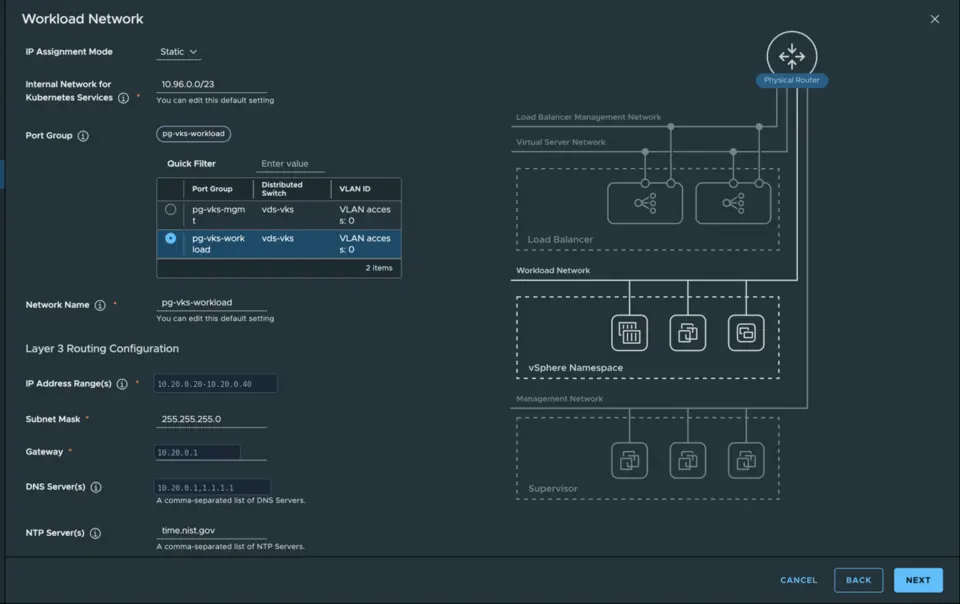
The load-balancer choice follows from the networking stack. On the distributed-switch path you get the Foundation Load Balancer for free — a lightweight Layer-4 balancer that vCenter provisions for you — which is plenty for cluster API endpoints and LoadBalancer-type Services. If you need Layer-7 routing, a WAF, or multi-site traffic management, that is the Avi Enterprise tier and a separate license. The old HAProxy appliance path is deprecated now; do not build new on it. Whichever you pick, the load balancer wants its own VIP range on its own subnet, separate from both management and workload — that three-way separation has been the pattern since the HAProxy days, and it carries forward unchanged.
From Supervisor to a workload cluster
Finish the wizard, watch it validate, deploy the three control-plane VMs, bootstrap Kubernetes and certificates, wire the load balancer, and land on a green Running. And here is the gotcha that costs people an afternoon: a Running Supervisor still cannot create a single VKS cluster. There is a second, separate gate. You have to create a content library holding the VKr node images — subscribe it to VMware's content delivery network rather than hand-managing a local one — and associate it to the Supervisor. Until that library exists and has synced, cluster creation fails in a way that looks mysterious until you think to check the library. It is not part of the enablement wizard; it is easy to forget; plan for it.
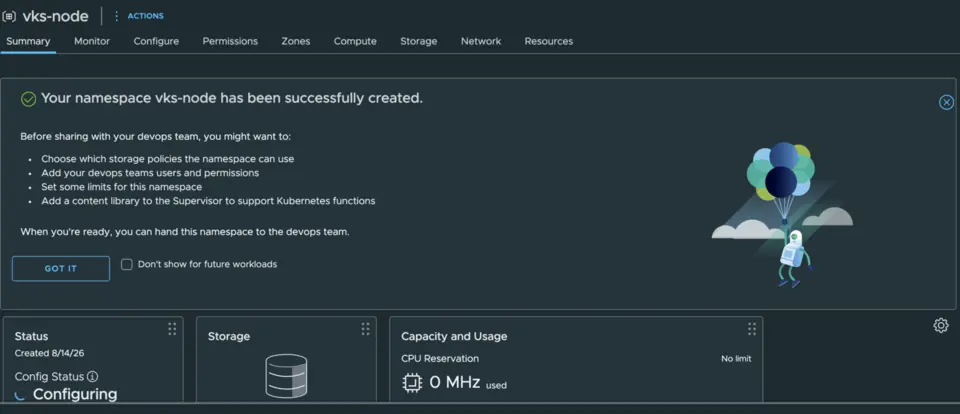
With the Supervisor healthy and stocked, you create a vSphere Namespace, and this is the object that makes the whole thing worth it. A namespace is a self-service boundary: you assign it permissions tied to your existing single sign-on identities, a storage policy that becomes a StorageClass, CPU and memory and storage quotas, and the VM classes and content library it is allowed to use. A developer with access to that namespace gets a standard kubectl endpoint and can provision clusters inside the guardrails you set, without filing a ticket. Under the hood the namespace maps to a vSphere resource pool, so your VI admins can see and manage its consumption with the tools they already use. That is the ticket-queue-versus-shadow-IT standoff, resolved without a separate platform.
Provisioning the cluster itself is anticlimactic in the good way. You download the current CLI — the old kubectl-vsphere plugin is deprecated in favor of the unified VCF CLI in version 9, though the legacy plugin is still offered for compatibility — log in to the Supervisor, switch context into your namespace, and kubectl apply a Cluster API manifest. That YAML references a versioned built-in ClusterClass, pins a Kubernetes version with a compound string you should copy exactly rather than type, and names the VM class and storage class the namespace already exposes. Then you watch the machines converge. It is upstream Cluster API, declarative and GitOps-friendly, which means the skills and tooling your team already has transfer directly.
Why VKS fits an existing vSphere estate
So why is this a good choice, specifically, for a shop already on vSphere? The honest answer is not 'better Kubernetes.' It is that Kubernetes stops being a second platform. There is no separate fleet of Linux management VMs to provision, patch, and secure — the control plane lives inside the hypervisor you already run. The nodes are ordinary VMs, so they inherit DRS placement and vSphere HA restart protection for free, and in a three-zone deployment they can span real failure domains. The storage is your storage. The identity is your identity — authentication chains back to vCenter single sign-on and OIDC rather than a parallel identity system stood up per cluster.
The second half of the case is that none of this comes at the cost of a proprietary fork. VKS guest clusters are upstream, CNCF-conformant Kubernetes; standard manifests, Helm charts, and operators run unmodified, and you can swap the default Antrea CNI for Calico or Cilium. Because each VKS version ships its own versioned ClusterClass, upgrading the platform does not force an unwanted rolling update of clusters still pinned to an older class. And in Cloud Foundation 9.1, cluster lifecycle decoupled from the platform release train, so you patch Kubernetes versions on their own cadence — the way you already patch ESXi through Lifecycle Manager. Broadcom quotes large speedups on deployment and upgrade; treat those as vendor figures, but the shape of the claim — Kubernetes managed like the rest of vSphere — is real.
The obvious alternative is bring-your-own: SUSE Rancher managing RKE2 clusters on the same vSphere. That comparison is genuinely two-sided. Rancher's management plane is infrastructure-agnostic — the same brain manages vSphere, EKS, AKS, GKE, and edge clusters from one pane, and its Fleet GitOps engine is a more mature multi-cluster story than VMware's, which is still consolidating. If your future is multi-cloud, or you want a Kubernetes control plane deliberately decoupled from any one hypervisor, Rancher is the better fit, and both are conformant upstream, so your workloads are portable either way. VKS wins on the opposite axis: unified day-two operations for a team already living in vSphere, and no separate license line — it is bundled in the Cloud Foundation or vSphere Foundation subscription you are already buying, whereas Rancher's enterprise support is a second subscription that repriced steeply in 2025. The independent read I trust most puts it plainly: VKS is the logical choice if you already run this platform and have a recurring, not occasional, need for Kubernetes. It is not a green-field recommendation.
The checks that would have saved time
A few things that will bite you, gathered in one place because I hit or nearly hit all of them. The MTU has to be right end to end or enablement stalls silently. The content library is a real second gate — a green Supervisor is not yet a working one. The one-zone-versus-three-zone and the control-plane-size choices are one-way doors; you can grow the size but never shrink it, and you can never add zones to a one-zone deployment. The load-balancer and networking realization is where the hours actually go — the built-in balancer removed the NSX barrier, but the three-way subnet layout still demands care. And control-plane reachability is the quiet one: DNS, NTP, and routing to the management network have to be correct before you start, because the deployment state machine will happily march up to the certificate step and then wedge if they are not.
That is the whole build log, and it lands where the honest version of the pitch does. VKS is not the best Kubernetes in the abstract, and it is not the thing to reach for if you are starting from bare metal and no hypervisor. It is operational leverage for a specific, common situation: you already run vSphere, you already have the admins and the storage and the identity, and you have a standing need for Kubernetes rather than a one-off. In that case VKS lets you add it as a capability instead of a second empire — and after doing the work by hand, that framing held up better than I expected.
References
- VKS 3.3 is now GA — Broadcom The rename from Tanzu Kubernetes Grid Service to vSphere Kubernetes Service
- vSphere Supervisor architecture — Broadcom TechDocs The Supervisor control plane and its components
- VKS guest-cluster architecture — Broadcom TechDocs How the Supervisor provisions conformant guest clusters
- Prerequisites for enabling the Supervisor — Broadcom TechDocs The hosts, DNS/NTP, MTU and storage-policy checklist
- Choosing a load balancer for vSphere Supervisor — Broadcom Foundation Load Balancer vs Avi, and the retired HAProxy path
- Kubernetes releases and the content library — Broadcom TechDocs The VKr node-image library that gates cluster creation
- Provisioning a cluster with the versioned ClusterClass — Broadcom TechDocs The Cluster API manifest and version pinning
- Operationalizing the VCF control plane for Kubernetes — Broadcom Lifecycle decoupling in Cloud Foundation 9.1
- Create and configure a vSphere Namespace — Broadcom TechDocs Namespaces as self-service boundaries
- VKS: not for the faint of heart, but powerful — Joep Piscaer An independent practitioner assessment of where VKS fits