Two disclaimers, then the story.
This is my own environment. Not work, not anybody's production, and nothing in it was ever near a customer. I am careful about that line, so I would rather draw it at the top than leave you wondering.
The agent is one I wrote. Every mistake below is therefore mine twice over, once for building the gap and once for walking into it. That is not modesty, it is the reason this is worth reading at all. When a vendor's tool fails you file a bug. When your own tool fails you find out what you actually believed.
I have been building an infrastructure agent called Rhodes for a while now. This week I let it upgrade a hypervisor host for the first time, on its own, against a cluster I care about.
The upgrade worked. Everything after the upgrade did not.
This is the write-up, because the failure is more useful than the success and because I want the shape of it written down before I sand the edges off it in my memory.
What I asked it to do
Take one ESXi host from 8.0.3 to 9.1.0. Approve the plan in Slack first. Do not surprise me.
The important design decision happened before any of that. My first version had the agent doing the upgrade itself over SSH, driving esxcli, staging the offline bundle onto a datastore by hand. It worked in tests. I threw it away.
vSphere Lifecycle Manager already does this. It owns maintenance mode, staging, dependency resolution, the install, the reboot, and bringing the host back out of maintenance mode afterwards. It has done it for years and it is supported. Writing my own version of it meant maintaining a worse copy of somebody else's mature product, and it meant that when it broke I would be alone with it.
So the agent drives vLCM. It sets the desired image on the cluster, asks for a compliance check, submits the remediation, and then watches the task. That is one API call and some polling. The interesting work is everywhere else.
The part vLCM cannot do here
There is no shared storage in this cluster. Every datastore is local to its host.
That matters more than it sounds like it does. vLCM's remediation puts the host into maintenance mode as its first step, and maintenance mode means evacuating the running workloads. With no shared storage there is nowhere to evacuate to. The migration has no destination. vLCM does not fail in that situation. It sits at zero percent and waits for a thing that will never happen.
So the agent drains first. It asks the guest to shut down cleanly through VMware Tools, waits for it to actually stop, and only then hands vLCM a host with nothing running on it. By the time the lifecycle manager starts work there is nothing left for it to evacuate.
One more piece of context, which the screenshots will give away anyway: the host is itself a virtual machine. This corner of the estate is nested, one hypervisor running inside another, and that is exactly what makes a real rollback point possible. Before the drain, the agent snapshots the machine the host runs on. It knows which machine that is because both layers report the same hardware identity, one SMBIOS UUID surfacing in two different inventories, and its graph joins those records into one thing wearing two names.
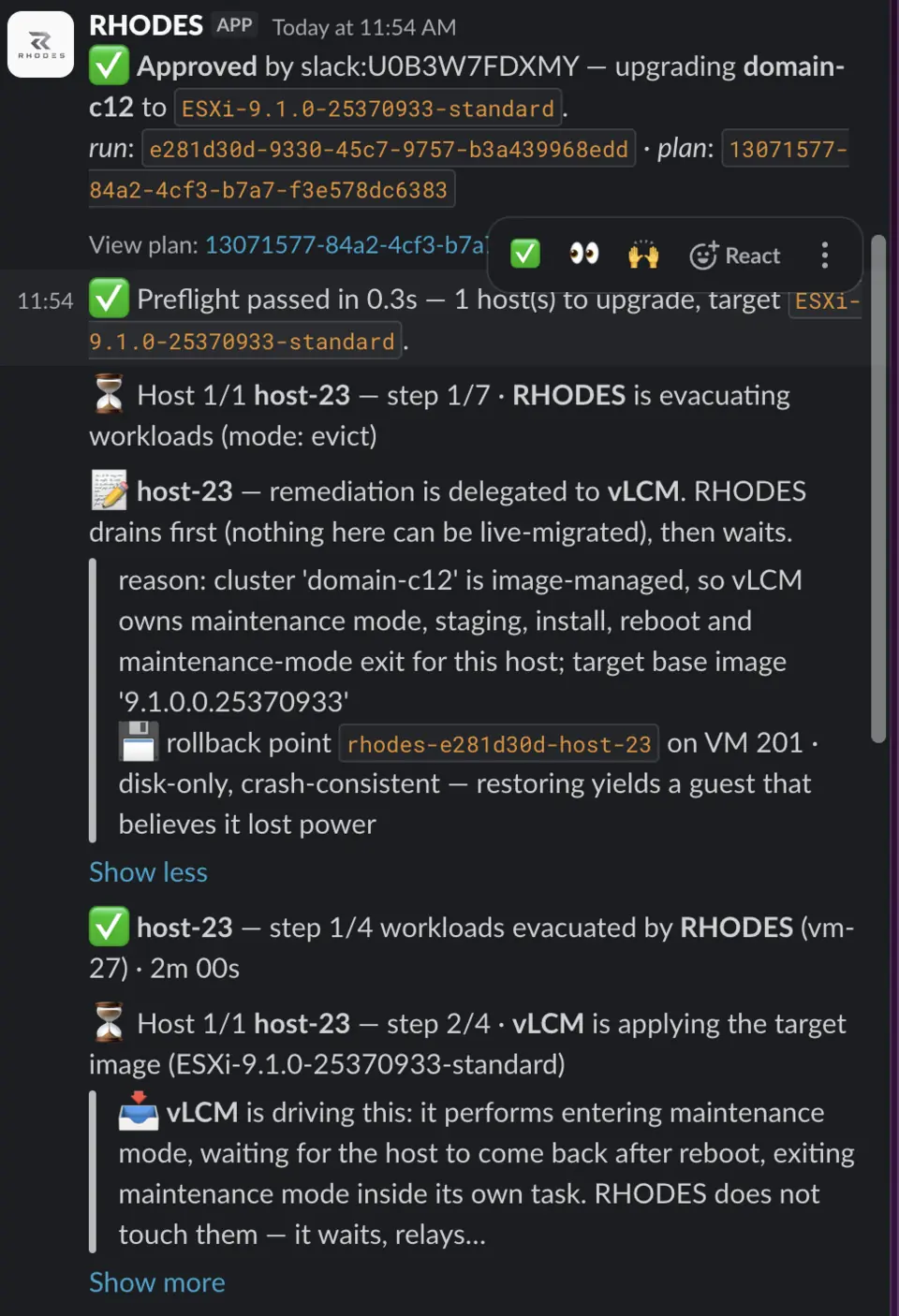
The workload it shut down was the only control plane node of a Kubernetes cluster. I knew that going in. That was the accepted cost of the window.
Two snapshots went into this window, not one. The agent's rollback point is a snapshot of that underlying machine, and it is crash consistent: restore it and you get a control plane that believes it lost power mid write. So before approving anything I took a proper etcd snapshot by hand. A hypervisor snapshot of a database is not a backup of the database, the same way a photograph of a filing cabinet is not a copy of the files.
It did the dangerous part correctly
The remediation ran. The host rebooted onto the new image and came back out of maintenance mode.
Then the agent did the thing I am most pleased about. It did not trust the task result. It went and asked vCenter separately what the host was actually running, and compared that against what it had been asked to install:
expected `ESXi-9.1.0-25370933-standard`, vCenter reports 9.1.0, build 25370933, match on build and version
An upgrade that reports success by reading its own homework is not verification. This one went and looked.
Then step four of four
The last step is to power the workload back on. Ten minutes into the run, it failed in about a third of a second.
The error it gave me was this, in full:
vSphere SOAP fault:That is the entire message. There is nothing after the colon.
I want to be fair about this: the fault was real, and the agent surfaced the fact of it immediately and correctly. But it stripped the only part that mattered on the way through. I sat there looking at a punctuation mark.
The rollback then failed for the same reason
The agent rolled back. Rollback for a failed host means putting things back the way they were, which in this case means powering the workload on.
Which is the action that had just failed.
So it failed again, identically, and the agent stopped and said this:
The estate is in neither the old nor the new state. Hands on recovery required.
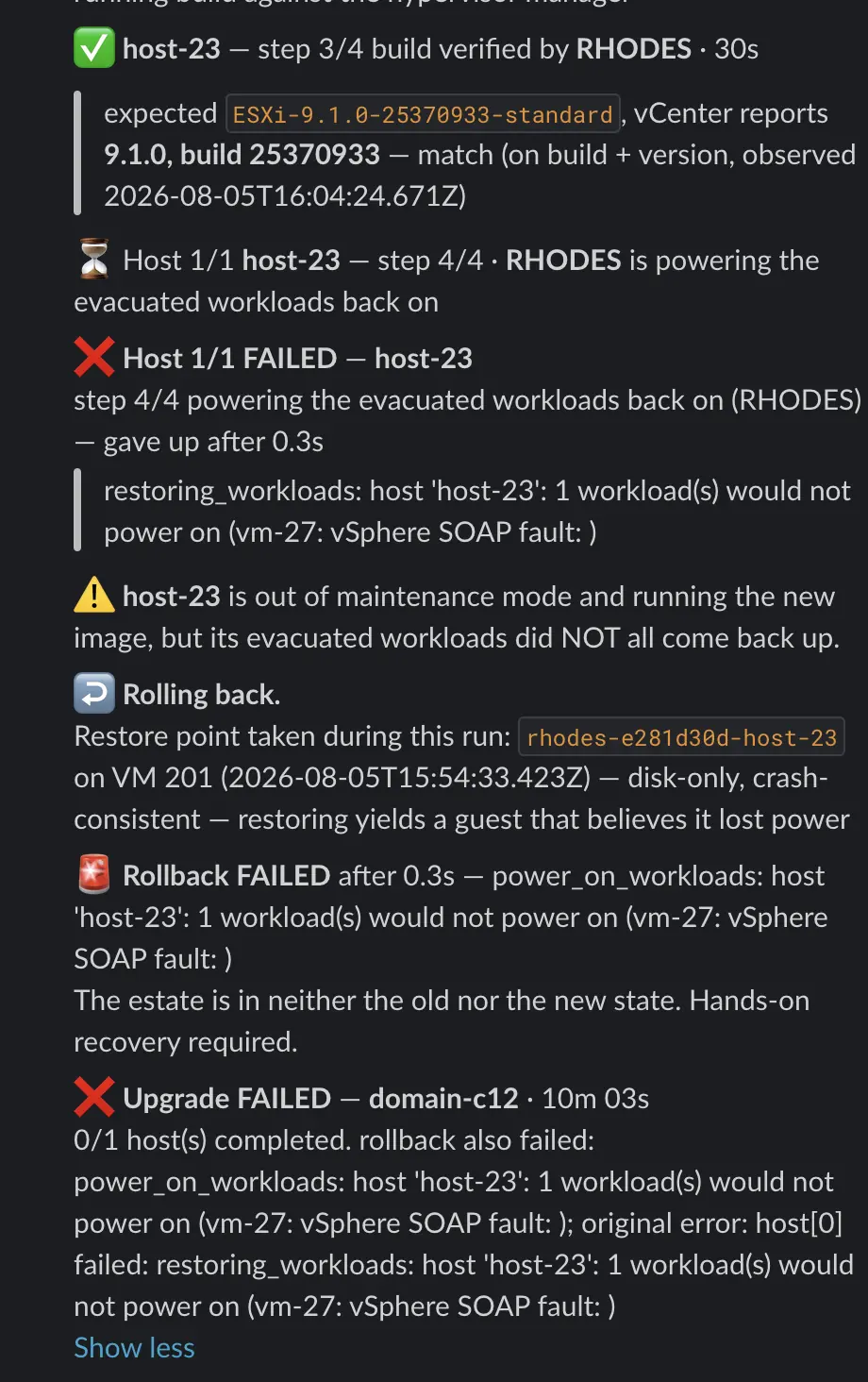
I have complained before about tools that report success when they have not succeeded. This one told me plainly that it had left things in a broken state and that it needed a human. That is the correct behaviour and I would rather have it than a green tick. But it is not a rollback. A recovery path whose only move is to retry the thing that just failed is not a recovery path.
The actual cause was arithmetic
I went at it directly through the REST API instead of the SOAP path the agent was using, and got the real fault on the first try:
Failed to extend swap file ... from 0 KB to 25165824 KB : No space left on deviceHere is what I did not know, or knew once and had not thought about in years.
When you power off a virtual machine, ESXi deletes its swap file. When you power it back on, it recreates it, and by default that file is the size of the machine's configured memory. The virtual machine in question has 24 GB of RAM. So starting it required creating a 24 GB file.
Its datastore had 19.6 GB free.
The machine could not have started. Not at that moment, not an hour later, not with any amount of retrying. There was another datastore on the same host with 56 GB free, sitting there the whole time.
The fix was to point the host's swap location at the datastore with room and tell the virtual machine to use it. Nothing deleted, nothing destroyed, reversible in one call. The machine powered on. The Kubernetes control plane was back about eighty seconds later, a little over half an hour after it went down, and the cluster settled itself over the next few minutes.
What I actually got wrong
The agent ran nine preflight checks before it touched anything. They all passed. One of them checked that the provider implements the verb for powering workloads back on.
It checked that the function existed. It never checked whether calling it could succeed.
That is the whole bug, and it is not really a bug in the code. It is a gap in how I thought about the sequence. I had rehearsed the drain. I had rehearsed the remediation, against the live host, with nothing powered off, and it came back clean. I never rehearsed the restore, because I was thinking of the restore as cleanup rather than as a step that could fail on its own terms.
Every input to that failure was available before anything was touched. The machine's memory size is in its configuration. The datastore's free space is a number you can read at any time. Twenty four is larger than 19.6. That comparison was available at step zero and I did not ask for it until step four, at which point the control plane was already down and the question had become expensive.
The DNS thing
One more, because it is the part that actually bit me rather than the part that is technically interesting.
The approval card in Slack was honest about what it did not know. It said, in a warning box, that no impact assessment had been supplied, that it could not tell me what would go down or for how long, and that I should approve only if I already knew what ran on those hosts.
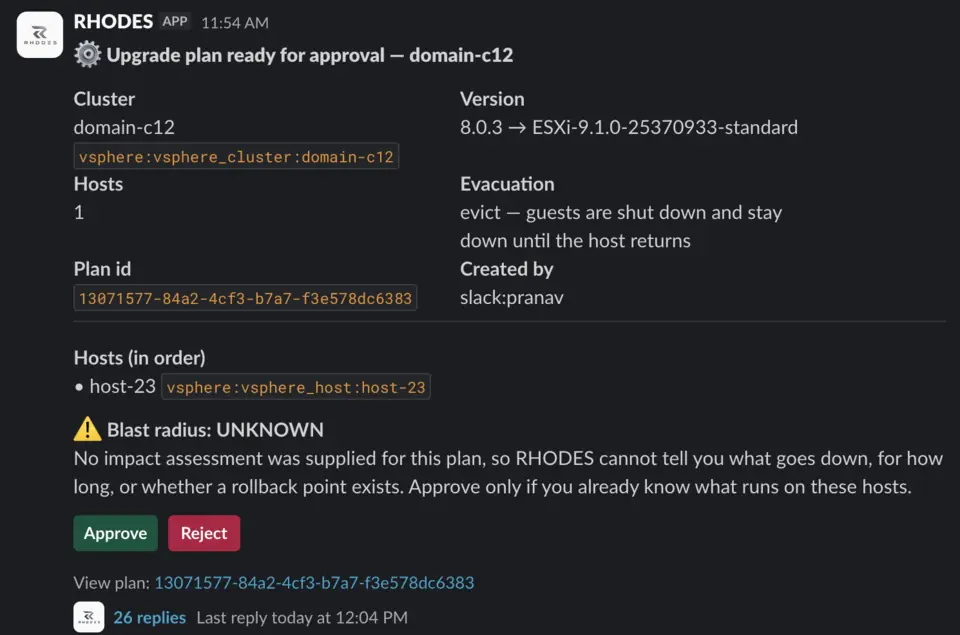
I did know. I knew the control plane was on that host. What I had not connected was that the Pi-hole I wrote about a while back, the one running on Kubernetes with no Pi in it, lives on that same node, and that half of what I own resolves DNS through it. So partway through the window my name resolution stopped working, which is a memorable way to learn where your dependencies are.
I want to be careful about the lesson here. The agent did not mislead me. It told me clearly that it did not know the blast radius and that I should not approve unless I did. That is better behaviour than inventing a confident impact assessment, which is what I suspect most tools would do. But honest ignorance and knowledge are not the same thing, and I was the one who filled the gap wrong.
Three things I would check before pointing an agent at a host
None of these are clever. All three would have caught this before the control plane went down, and I suspect they generalise past my particular mistake.
Rehearse the whole sequence, not just the dangerous middle. A dry run that stops before the last step is a rehearsal of the part you found interesting, and failures do not care which part that was. The steps at the end get skipped precisely because they feel like cleanup, and cleanup is where mine died.
Make the preflight ask whether a call would succeed, not whether it exists. Mine confirmed the provider implements the verb for powering machines back on. That is a real check and it is nearly worthless. The useful version compares free space against configured memory and refuses before the drain rather than after it. In this run it was the difference between the ten minutes of downtime the window was priced at and the half hour it actually cost.
Decide what your rollback does when the failure is a precondition. Retrying is recovery when something was transient. When the world is simply not in a state where the action can succeed, retrying is the same failure again with more delay attached. My rollback had exactly one move and it was the move that had just failed. It needs to know the difference, or it needs to stop and say so, which at least is honest.
There is a fourth that is less about agents and more about me. Faults have to arrive intact. A SOAP fault with the message stripped out cost me the first twenty minutes of this, and the information was one API call away the whole time. It just did not survive the trip through my own code.
The thing I keep coming back to
The agent did the irreversible part correctly. It drove a real lifecycle manager rather than pretending to be one, it verified the outcome against an independent source rather than its own result, and when it ended up somewhere bad it said so in plain language instead of reporting a success.
Then it fell over on a subtraction problem.
I have been thinking of rollback as a safety net, which is the wrong metaphor, because a safety net is a physical object that either exists or does not and you can see it from the platform. A rollback path is a code path. If it has never run, you do not have a rollback. You have an assumption with a function signature.
Mine had never run. Now it has.
References
- Field Signal - I run Pi-hole on Kubernetes. There is no Pi. The DNS service that went down with the control plane during this window. Built earlier, on the same node, which is exactly the dependency I had not connected.
- Broadcom TechDocs, Swap Space and Memory Overcommitment (vSphere 9) The mechanics behind the failure: the swap file is created at power on, sized to the machine's configured memory minus any reservation, and if it cannot be created the machine cannot power on.